

Appendix E, Using the Help
| Using the Search Tool | |
|
Using the Search Options |
Appendix E, Using the Help |
|||
Search results are listed below the Search text box. Below each topic title (link), you can see the chapter (or appendix) in which the topic exists. This information may help you exclude some search results before following the links.
If the Show Excerpts option is enabled, the excerpt appears below the chapter (or appendix) name.
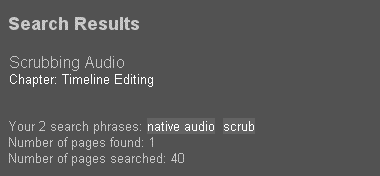
At the bottom of the list of results, the search phrases are repeated, and the number of results is displayed.
Since search results are sorted starting with the highest score, the results at the top of the list are often more relevant to your search than those at the bottom. Score increases when search terms are found in a topic's title and in a topic's text. (Note that score does not increase for every occurrence of the search term in the topic; it increases for the first occurrence only.) When the scores of topics are equal, the topics are listed in the order they are found in the Help.
To narrow your search, try the following steps:
1. Include more terms in your search.
2. Follow less search result links by pre-screening the result topics. One way to do this is by looking at the chapter (or appendix) in which each topic exists. If a chapter title does not seem relevant to your search, try other links first. Another way to pre-screen results is to show excerpts. See Using the Search Options. The sentence where a search term is found may indicate if the topic seems promising.

Search results can include excerpts of the found text to help you select which topic to view first. For example, you may decide to click a topic link when the excerpt text for that topic begins to answer your question. The excerpt text includes the words before and after the first occurrence of the search phrase.
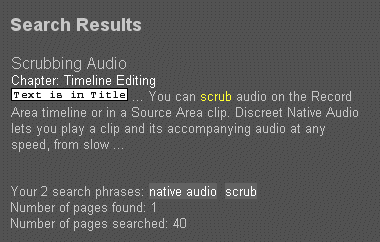
Note: The "Text is in Title" icon appears when a search phrase is found in the title of the topic.
When you search for more than one search phrase, the excerpts only highlight the first occurrence of your last search phrase. If you are searching using the Match Any Phrase option, it is possible that the last search phrase is not found in a topic that appears in the search results. The following message appears:
[No excerpt because the last search phrase was not found in the body of this topic.]
A chapter link displays the Contents for a specific chapter or appendix. Chapter topics do not have any body text, so a search excerpt cannot be shown for them.
Images are represented with [i m a g e] in the full-text search. Therefore, you may see this in the search excerpts.
When a cross-reference is in the excerpt, the title of the link is not included. For example, the excerpt text for 'See Using the Help' is See.
| |