
|
Mesh > Extract |
Detaches the selected faces from the associated mesh. The extracted faces become a separate shell within the existing mesh. If you select the mesh in object mode both the mesh and any extracted faces get selected.
Related topics

|
Mesh > Extract > 
Separate extracted faces
Turn it on to separate faces automatically after they are extracted. The extracted faces will be separated into their own separate object. Any pre-existing shells in the mesh will not be affected. This is the default setting.
If this option is turned off, you’re in component selection mode with all the extracted faces selected.
Offset
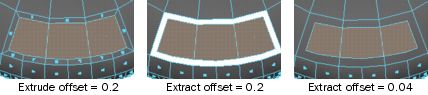
Enter a value to offset the edges of the extruded, extracted, or duplicated faces.
This option can be used to produce a bevel effect for extrusions, cut-outs around faces using Extract, and to uniformly scale duplicated faces.
polyChipOff node
Additional modifications can be made to an extracted face(s) by editing the following attributes on the polyChipOff node using the Attribute Editor or Channel Box.
Translate
This value moves the extrusion or duplicated face locally along the X, Y, or Z-axis. Positive or negative values indicate how far the extruded or duplicated faces are moved locally.
Rotate
This value sets the angle at which you want to rotate the extruded or duplicated faces locally around the X, Y, or Z-axis.
Scale
This value scales the extrusion or duplicated faces locally along the X, Y, or Z-axis.
Direction
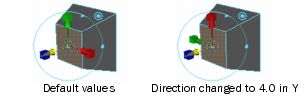
Enter a value to set the location of the X, Y, or Z-point in the local axis. Notice how the manipulator handles change accordingly when you change the Y direction value to 4.0.
Global Values
Translate
This value moves the extruded or duplicated faces along the X, Y, or Z-axis.
Rotate
This value sets the angle by which you want to rotate the extruded or duplicated faces around the X, Y, or Z-axis.
Scale
Enter a value to scale the extrusion or duplicated faces along the X, Y, or Z-axis.
Random
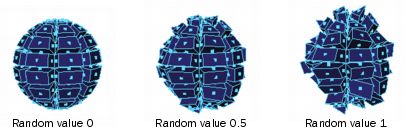
Enter a value to duplicate faces in random directions, with a value of 0 to 1. Lower values are closer to the specified direction. Higher values are more randomized.
In the following example, faces were extruded with random values of 0, 0.5, and 1.
Duplicate
Turn this attribute on to duplicate the faces instead of extracting them.
World space
Turn on the World Space Coords to use the world coordinate system when you change values randomly.
Keep faces together
When this attribute is on, Maya extracts each face separately. When this option is off, Maya extracts the faces as a whole.