
|
Plug-in Manager |
A plug-in is an add-on module that extends Maya’s capabilities. File translators are plug-ins you use to import and export various file formats. You can create or purchase specialty plug-ins to customize Maya for a specific job.
Some features that can be added through plug-ins are:
- file translators
- tools
- objects (nodes)
- MEL commands
- device drivers
Related topics

|
|

|
The Plug-in Manager identifies which plug-ins are loaded into Maya. If you have a plug-in that you use frequently, you can make sure it is always there. The Plug-in Manager automatically scans all the directories in the plug-in path and lists available plug-in features.
loaded
Turn on loaded to load the plug-in for the current Maya session.
auto load
Turn on auto load to load the plug-in so that the next time you start Maya the plug-in loads automatically.
Information window
To view information about a particular plug-in, you must first load it, then click the i button beside the plug-in.
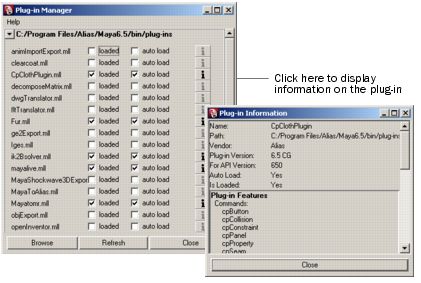
Maya caches the list of current plug-ins. If you have added a new plug-in, click Refresh to update any changes.
Maya displays the following information for a selected plug-in:
Name
The name of the plug-in. On Linux, plug-ins have the extension .so. On Windows, they have the extension .mll. On Mac OS X, the extension is .lib.
Path
The location of the file. On Linux, the default plug-in location is:
/usr/autodesk/maya2008/bin/plug-ins
On Windows, the default plug-in location is:
drive:\Program Files\Autodesk\Maya2008\bin\plug-ins
On Mac OS X, the default location is
/Applications/Autodesk/maya2008/Maya.app/Contents/MacOS/plug-ins
Vendor
The manufacturer of the plug-in.d
Plug-in Version
The version number of the plug-in.
For API Version
The version of the Maya API (Application Programmer Interface) the plug-in was compiled for.
Auto Load
Indicates whether the plug-in has been marked for auto load.
Is Loaded
Indicates whether the plug-in is loaded.
Plug-in Features
Displays a list of the features added by the plug-in (for example, commands, dependency nodes, file translators).
To display additional plug-ins, click the triangle to open the Other Registered Plug-ins section.